Keel · Guides · Today & Calendar
Correct a recorded time
I entered the wrong time — how do I fix it?
Open the dose under Done, tap Edit log, change Taken at and save; Keel keeps the earlier version and re-judges on-time or late from the new time.
AvailabilityFree · Assumes a dose already logged
Open the dose under Done, tap Edit log, change Taken at, tap Save. Keel keeps the earlier version and re-judges on-time or late from the new time.
Today › Done · n (tap to expand if collapsed), or the dose’s day in Calendar.
- A logged dose; a skipped one shows Undo skip, not Edit log.
Two times belong to every recorded dose
Every recorded dose has a planned time (or the Move time) and the Taken at time you recorded. The row’s time column shows the effective time — the Move time if moved, the snooze time while snoozed, otherwise the planned time. The expanded row shows site and notes (or “Logged — no site or notes recorded.”) and Edit log / Undo — not the recorded time, which is inside Edit log. A dose logged on time carries no status word; LATE appears only when it applies.
Steps
- Under Done · n, tap the dose to expand it.
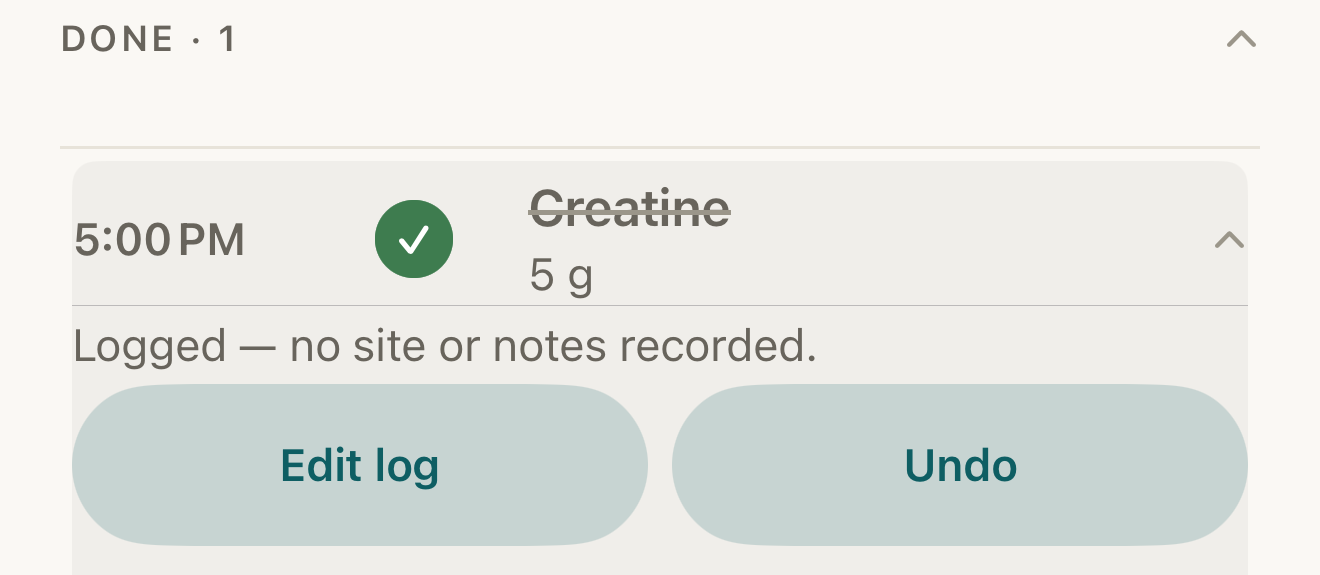
Fictional record: a logged dose under Done, expanded to show its notes line and the Edit log and Undo buttons. - Done · n
- time column (planned 5:00 PM)
- Edit log
- Undo
Where this screen comes from
- File
G10-F1-done-row-expanded.png(1320×575);G10-F1-done-row-expanded.webpis a lossy encode of it- Derivative SHA-256
520962647390b6f5cd50ca63b433ac98d331b225c8c36dc60f25fab26592ba75- Source
G10-F1.pngin packageKeel-V1-4cbadaa-guide-figures-D-20260915-175842-31382- Source SHA-256
0af7d7ff121a7d03d06fdc6744143d74df85191300b8b986ae8b06f77b8aa363- Package seal
734f8ee432472a7cd790042b30552ee099fee72dcc2a2f9badbaa48a14ef8bbe- Captured from
- Keel 1.0.0 (1), implementation
4cbadaa1c63a0678b61e703583fadc9af226267d - Operation
- crop x0 y1830 w1320 h575 (source pixels, origin top-left)
The numbered markers are drawn by the page, not into the image.
- Tap Edit log.
- Change Taken at (never later than now). The amount sits under Dose, the site under Injection site for injectables, then Notes; change any you need.
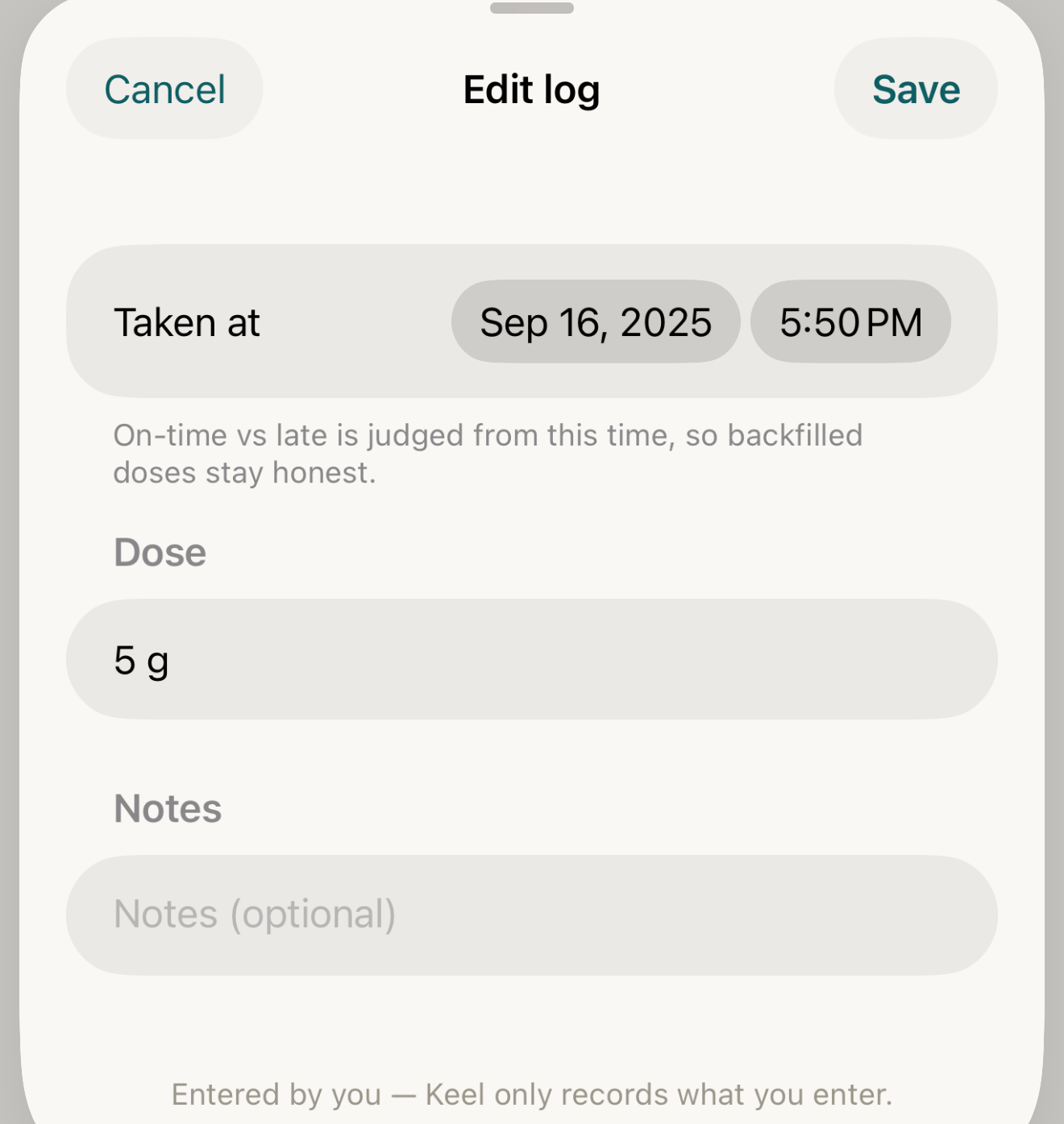
Fictional record: the Edit log sheet — change Taken at and Keel re-judges on-time or late from that time. - Taken at
- Dose (shows 5 g)
- Notes
- Save
Where this screen comes from
- File
G10-F2-edit-log-sheet.png(1320×1395);G10-F2-edit-log-sheet.webpis a lossy encode of it- Derivative SHA-256
2e1bb26aef158db0b58457b034046f2a5316e06c4f9b47186c8377822267ebcf- Source
G10-F2.pngin packageKeel-V1-4cbadaa-guide-figures-D-20260915-175842-31382- Source SHA-256
5300fef89c39b7b2f22cfe8e2441dad105496487a93c5a97bbe217f6f7a75e86- Package seal
734f8ee432472a7cd790042b30552ee099fee72dcc2a2f9badbaa48a14ef8bbe- Captured from
- Keel 1.0.0 (1), implementation
4cbadaa1c63a0678b61e703583fadc9af226267d - Operation
- crop x0 y1365 w1320 h1395 (source pixels, origin top-left)
The numbered markers are drawn by the page, not into the image.
- Tap Save.


A 5:00 PM dose, corrected twice
Fictional exampleThe names and values below are made up to show how the parts relate; they are not a suggestion.
- Planned
- Creatine · 5 g · 5:00 PM daily
- Taken at 5:50 PM
- Done — no status word (under an hour after)
- Corrected to 6:20 PM
- LATE (an hour or more after)
- Corrected to 5:40 PM
- Done again
Timed doses: Taken at less than an hour after the planned or Move time, or any time before it, is Done; an hour or more after is Late. Any-time doses count calendar days: the same or an earlier day is Done, a later day is Late.

- LATE word
- Edit log
Where this screen comes from
- File
G10-F3-done-row-late.png(1320×575);G10-F3-done-row-late.webpis a lossy encode of it- Derivative SHA-256
80f81d0e60b796bc9cb00970d56a3ae946e1c6bee3bffb730b8febe20c996c83- Source
G10-F3.pngin packageKeel-V1-4cbadaa-guide-figures-D-20260915-175842-31382- Source SHA-256
eb65f559f232e630bf12fd2ccf28eee778f488681a8bbb9b15b03578a933b551- Package seal
734f8ee432472a7cd790042b30552ee099fee72dcc2a2f9badbaa48a14ef8bbe- Captured from
- Keel 1.0.0 (1), implementation
4cbadaa1c63a0678b61e703583fadc9af226267d - Operation
- crop x0 y1830 w1320 h575 (source pixels, origin top-left)
The numbered markers are drawn by the page, not into the image.
What changes
The row keeps its place in Done · n; LATE appears or disappears by the rule above; the earlier version stays in Keel’s history, not overwritten; an attached supply profile re-applies the draw.
Where: Today › Done · n; the dose’s day in Calendar
If it looks different
- Needs review on the row?
- This synced history must be resolved before it can be changed.
- No Edit log?
- The dose was skipped; use Undo skip, then log it.
- “Can’t be read as an amount + unit — this field won’t save.” under Dose?
- Fix it before saving (a form like 0.3 mL or 250 mcg); the expanded row does not show the amount afterwards.
Correct a mistake
Edit again — every save keeps the previous version and re-judges Done or Late by the same rule (the hour for timed doses, the day for any-time doses).
- Undo returns the dose to pending and reverses any supply draw.
- Nothing is deleted: each earlier version stays in Keel’s history.
Keel tracks. It never advises. Editing a time changes only what you recorded; nothing here says when a dose should be taken.