Keel · Guides · Calculators
Plan the water
I know the draw I want.
Tools › Peptide Reconstitution › Plan the water: enter the vial amount, your dose and the draw you want it to land on, and read WATER TO ADD, DOSES PER VIAL and EACH DOSE DRAWS.
AvailabilityFree
Tools › Peptide Reconstitution › mode Plan the water.
- The vial’s amount, your dose, and the syringe draw you want the dose to land on.
Steps
- Choose Plan the water. The steps become Amount in vial, Your dose and Draw it lands on.
- Set Measured in (mg or IU) and enter Amount in vial.
- Enter Your dose (mcg or IU).
- Enter Draw it lands on in syringe units on the U-100 scale — 100 units per mL (presets 5, 10, 20, 25, 40, 50). Your syringe below changes how a draw is displayed, not this input.
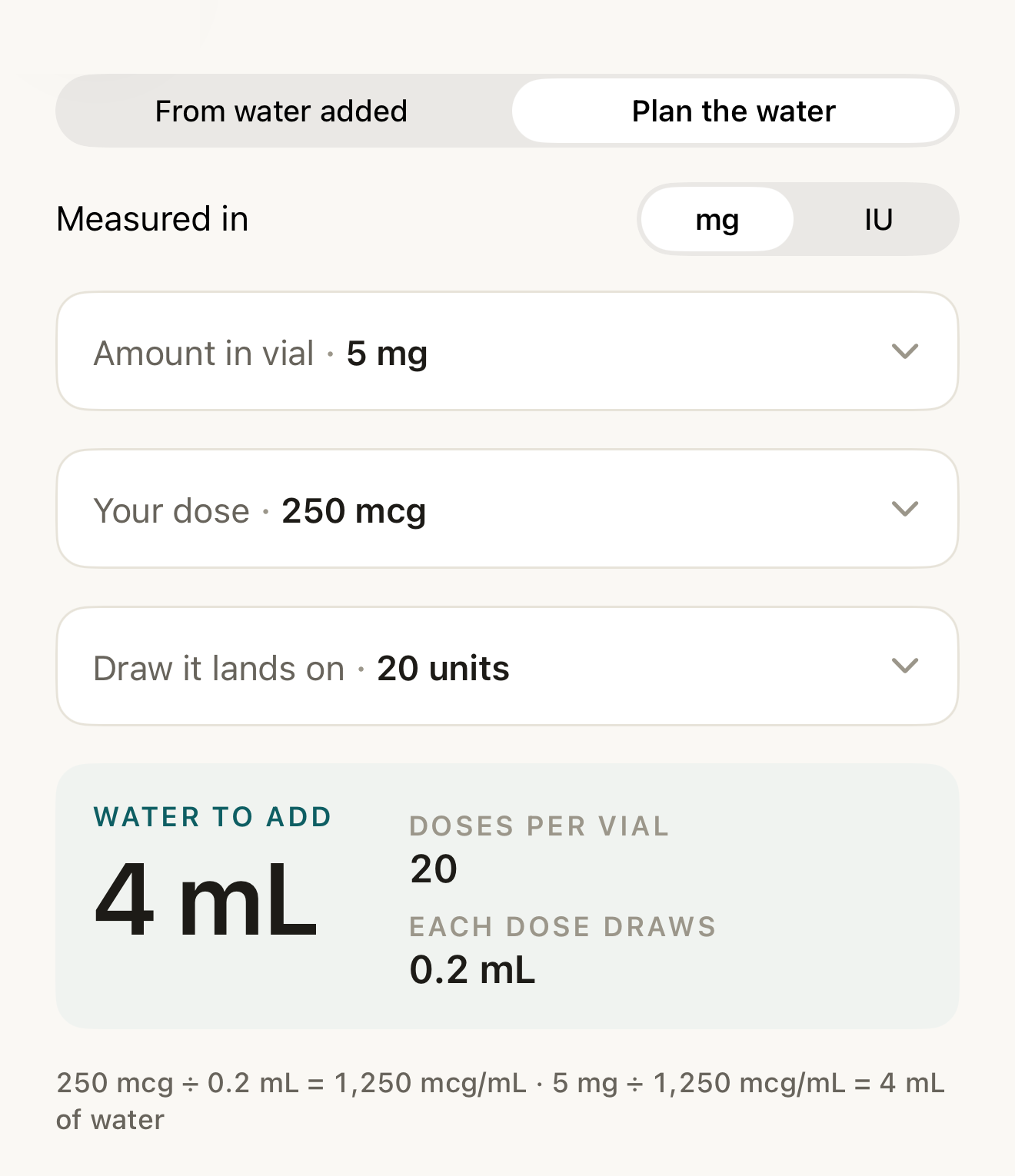
Fictional example: the app’s sample vial and dose plus a chosen draw of 20 units, and the water Keel computes — nothing here is a suggested vial, dose, draw or amount of water. - Plan the water (mode control above)
- Draw it lands on · 20 units
- WATER TO ADD
- arithmetic line
Where this screen comes from
- File
C11-F1-plan-the-water.png(1320×1530);C11-F1-plan-the-water.webpis a lossy encode of it- Derivative SHA-256
e3d408be236a510afa59cd2a153ab711c0cf759124bb4ea46e477f463b400a1c- Source
C11-F1.pngin packageKeel-WT-7e41269-guide-figures-B2-20260924-111151-1756- Source SHA-256
e80997c72ab7eab270398590c17974bd0bbf5e20bb055287b8ec17a24697174b- Package seal
f9b0083234734b6b16f58e455596067bde9182e8e0ff62c5e84cdfae8ad22c6f- Captured from
- Keel 1.0.0 (1), implementation
working tree 7e41269 (NOT a candidate; head 7e4126919da3a44a9ad2f2efaf3ad2467c1fbff7, build-input tree c863167fe1474c471d3562fe90f5f107c9598edff3903cdfc58b89bc7ae3032c, build build-20260924-103514-93133) - Operation
- mask x0 y300 w260 h96 #FAF8F4; crop x0 y300 w1320 h1530 (source pixels, origin top-left)
The numbered markers are drawn by the page, not into the image.

Vial 5 mg, dose 250 mcg, draw 20 units
Fictional exampleThe names and values below are made up to show how the parts relate; they are not a suggestion.
Vial 5 mg, dose 250 mcg, draw 20 units (0.2 mL): the concentration that makes 250 mcg land on 0.2 mL is 1,250 mcg/mL, so WATER TO ADD reads 4 mL; DOSES PER VIAL 20 (5,000 ÷ 250); EACH DOSE DRAWS 0.2 mL. The line beneath spells it: "250 mcg ÷ 0.2 mL = 1,250 mcg/mL · 5 mg ÷ 1,250 mcg/mL = 4 mL of water" (numbers are grouped in the English locale).
What changes
The three answers resolve independently: DOSES PER VIAL from the vial amount and dose, EACH DOSE DRAWS from the target alone, WATER TO ADD once all three values are valid; each shows a dash until then.
Where: The result block under the steps
If it looks different
- A step reads Needs a number or Needs a number above zero?
- That value blocks every answer that needs it.
- Switched back to From water added?
- It keeps Amount in vial and Your dose and opens the first incomplete step.
Plan the water divides the numbers you enter; nothing here suggests a dose, a draw or an amount of water.