Keel · Guides · Today & Calendar
Log an extra dose
I took one that wasn’t scheduled.
+ › Manage routines › the routine › Log a dose now settles today’s open dose if there is one, otherwise records an extra, off-plan dose.
AvailabilityFree · Assumes an active routine
+ › Manage routines › the routine › Log a dose now — "Settles today’s pending dose, or records an extra one."
- An active routine.
How it decides
The button first looks for today’s open dose of that routine and settles it as taken now; if today’s dose was skipped it un-skips and settles that; only when nothing is open does it record an extra, off-plan dose. An extra dose has no scheduled row, so it does not appear on Today’s list; it is always Done — there was no plan to be late against.
Steps
- Tap +, Manage routines, then the routine.

The routine’s own log button: it settles today’s open dose if there is one, otherwise records an extra dose. - Log a dose now
- its caption
Where this screen comes from
- File
B9-F1-log-a-dose-now-row.png(1320×250);B9-F1-log-a-dose-now-row.webpis a lossy encode of it- Derivative SHA-256
44a84922e605432b240f3c843d93aa53f2487e566b67a7936d9dfc3c7c7b8fb2- Source
B9-F1.pngin packageKeel-WT-7e41269-guide-figures-B1-20260924-090933-67253- Source SHA-256
4da65b5318ecfa69defabdfc7acbf0f2115af02d0dca568ce2691d4b34c6b2ba- Package seal
fd002ec92b03ee746be00143a4397ff542b7ef280c610dfb07bdf49a1ff4efc5- Captured from
- Keel 1.0.0 (1), implementation
working tree 7e41269 (NOT a candidate; head 7e4126919da3a44a9ad2f2efaf3ad2467c1fbff7, build-input tree 213aa887926d08f17538a5789db46f99fbc9a8120019b2cd3c59876621f68970, build build-20260917-181010-73820) - Operation
- crop x0 y1455 w1320 h250 (source pixels, origin top-left)
The numbered markers are drawn by the page, not into the image.
- Tap Log a dose now.
- If this routine’s latest taken log has a Taken at within the last three hours — checked before Keel decides whether it will settle today’s dose or record an extra — it asks "You logged <routine> <n> min ago. Log another dose?" (after an hour: "<h> h <m> min ago") — tap Log another dose to confirm, or tap outside the dialog to record nothing (on iOS 26 the confirmation is a popover anchored to the row, and no Cancel control is drawn).
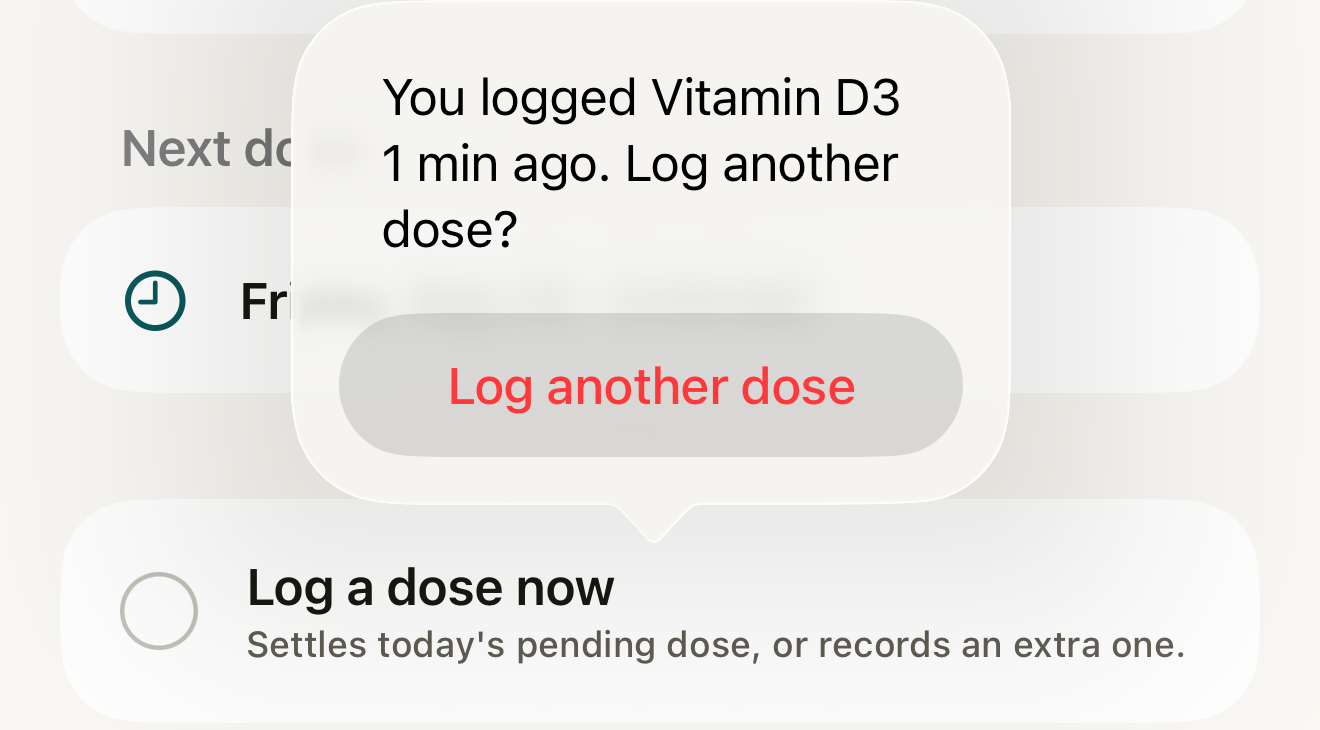
Fictional record: within three hours of a taken dose Keel asks before recording another; confirming records it; tap outside the dialog to record nothing. - the question
- Log another dose
Where this screen comes from
- File
B9-F2-log-another-dose-popover.png(1320×730);B9-F2-log-another-dose-popover.webpis a lossy encode of it- Derivative SHA-256
75b38bb74fa9de0a0508fff4e3e7b9ab2dce76838356dbee6f753fc5ccad07e6- Source
B9-F2.pngin packageKeel-WT-7e41269-guide-figures-B1-20260924-090933-67253- Source SHA-256
adb343492239629e4257eb75c53750ecca9022039bf43e81da370e7210d200a8- Package seal
fd002ec92b03ee746be00143a4397ff542b7ef280c610dfb07bdf49a1ff4efc5- Captured from
- Keel 1.0.0 (1), implementation
working tree 7e41269 (NOT a candidate; head 7e4126919da3a44a9ad2f2efaf3ad2467c1fbff7, build-input tree 213aa887926d08f17538a5789db46f99fbc9a8120019b2cd3c59876621f68970, build build-20260917-181010-73820) - Operation
- crop x0 y975 w1320 h730 (source pixels, origin top-left)
The numbered markers are drawn by the page, not into the image.

Fictional record: the extra dose is recorded at the current time; Undo removes it while you stay on this screen. - Logged
- Recorded at
- Undo
Where this screen comes from
- File
B9-F3-logged-row-undo.png(1320×250);B9-F3-logged-row-undo.webpis a lossy encode of it- Derivative SHA-256
4e31946cf2b633ee516389713021e6097cc981be9a09ee9f28e4b6263bb54cbd- Source
B9-F3.pngin packageKeel-WT-7e41269-guide-figures-B1-20260924-090933-67253- Source SHA-256
269ab002493aa7ea4e503de09c9311fb1298adbf223e81c5d1250e420f3bc716- Package seal
fd002ec92b03ee746be00143a4397ff542b7ef280c610dfb07bdf49a1ff4efc5- Captured from
- Keel 1.0.0 (1), implementation
working tree 7e41269 (NOT a candidate; head 7e4126919da3a44a9ad2f2efaf3ad2467c1fbff7, build-input tree 213aa887926d08f17538a5789db46f99fbc9a8120019b2cd3c59876621f68970, build build-20260917-181010-73820) - Operation
- crop x0 y1455 w1320 h250 (source pixels, origin top-left)
The numbered markers are drawn by the page, not into the image.


What changes
The row changes to Logged with "Recorded at <time>." and an Undo button until you leave the screen. The dose appears under Recent history; an attached supply profile draws down only when Pro inventory access, a readable amount + unit, a convertible unit and an unconflicted balance all apply; the rotation’s next site is used for an injectable.
Where: The routine’s detail screen and its Recent history
Correct a mistake
Tap Undo while the Logged row shows, or later swipe the entry under Recent history › Undo log.
- An extra dose disappears from the effective history — Keel appends a reversal rather than deleting the record ("the dose returns to pending (or disappears, if it was an extra)").
- A scheduled dose returns to pending; any drawn supply is restored either way.
If it looks different
- No confirmation appeared?
- The most recent taken log’s Taken at is three hours or older; the check runs the same way whether the button is about to settle today’s dose or record an extra.
- No Log a dose now?
- The routine is paused; resume it from the Routines sheet (swipe › Resume).
- "Couldn’t save"?
- Nothing was recorded.
Keel records the extra dose you say you took; the confirmation is a record check, never advice about taking or not taking one.