Keel · Guides · Today & Calendar
Log a dose now
How do I log this dose?
Tap the circle on the dose’s row to record it as taken now; tap the row for its other actions — Log done, Snooze, Skip, Log at a time… and Move to….
AvailabilityFree · Assumes at least one routine with a dose today
Today › the dose’s row. Until a dose is recorded, Keel labels it from its effective time (the planned time, or the snoozed or moved time): DUE, LATE an hour after it, MISSED 24 hours after it; a pending any-time dose stays DUE through its day.
- At least one routine with a dose today.
Steps
- Find the row: time column, the circle (the log control), the name, a caps word under the time when one applies.
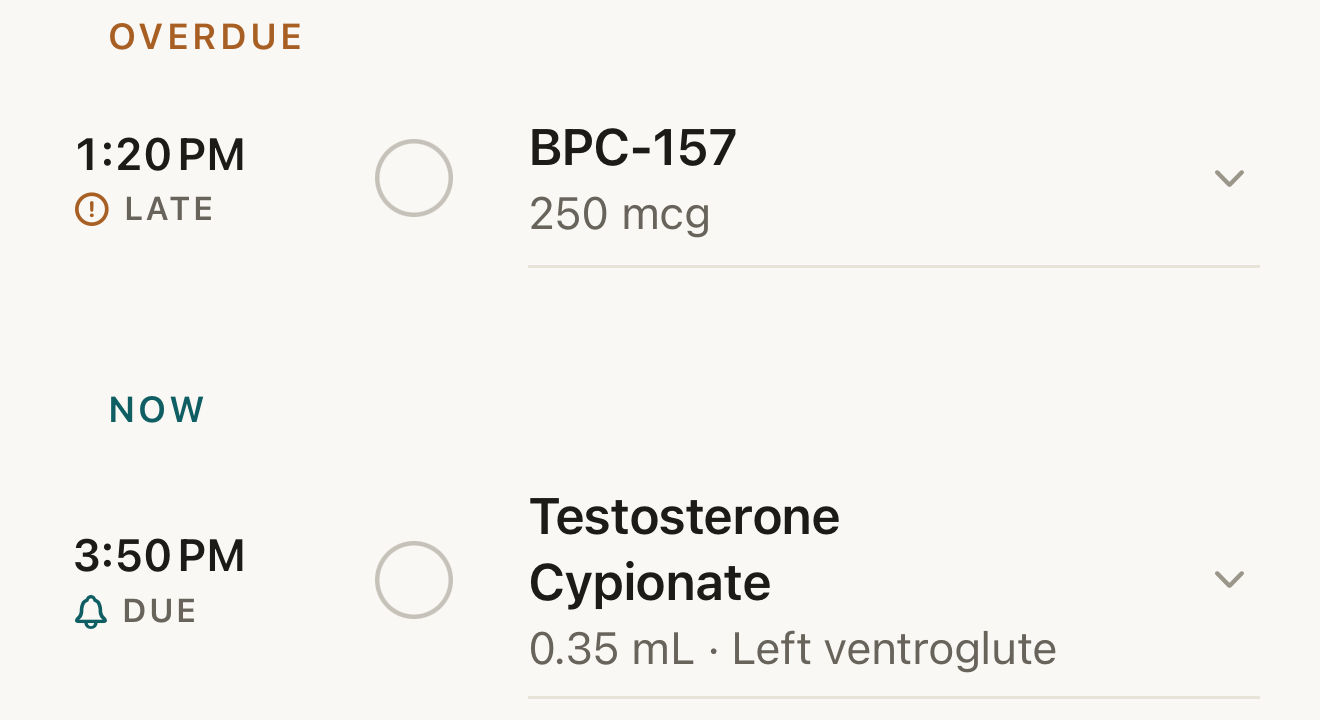
The Today list: tap the circle to log a dose now; the word under the time is Keel’s timing label; the chevron opens the row’s other actions. - circle
- LATE / DUE word
- chevron
Where this screen comes from
- File
G1-F1-today-overdue-now.png(1320×720);G1-F1-today-overdue-now.webpis a lossy encode of it- Derivative SHA-256
b43fbb324f5abb7986da9e0b846f11e31718e8e645df7d4949db845785022a9b- Source
store-1-today.pngin packageKeel-V1-4cbadaa-store-listing-20260908-1619- Source SHA-256
08b3a621e026031e63855f09282de94492ab1a74bbe41203f739284ed7f3e3e5- Package seal
bb6bb8cb8f301a369afef5cc37180914f5d7196376f0be585127f6cb51993aa6- Captured from
- Keel 1.0.0 (1), implementation
4cbadaa1c63a0678b61e703583fadc9af226267d(reused-unchanged) - Operation
- crop x0 y1215 w1320 h720 (source pixels, origin top-left)
The numbered markers are drawn by the page, not into the image. Full provenance.
- Tap the circle to record the dose as taken now. The mark fills, the name strikes through, and the row moves under Done · n. Tapping the filled mark again undoes. A full swipe from the left also logs (Done); a swipe from the right offers Skip and Snooze.
- Or tap the row to open its actions: Injection site for injectables, Notes (optional), the capsules Log done, Snooze (timed doses only) and Skip, and the quiet Log at a time… and Move to….
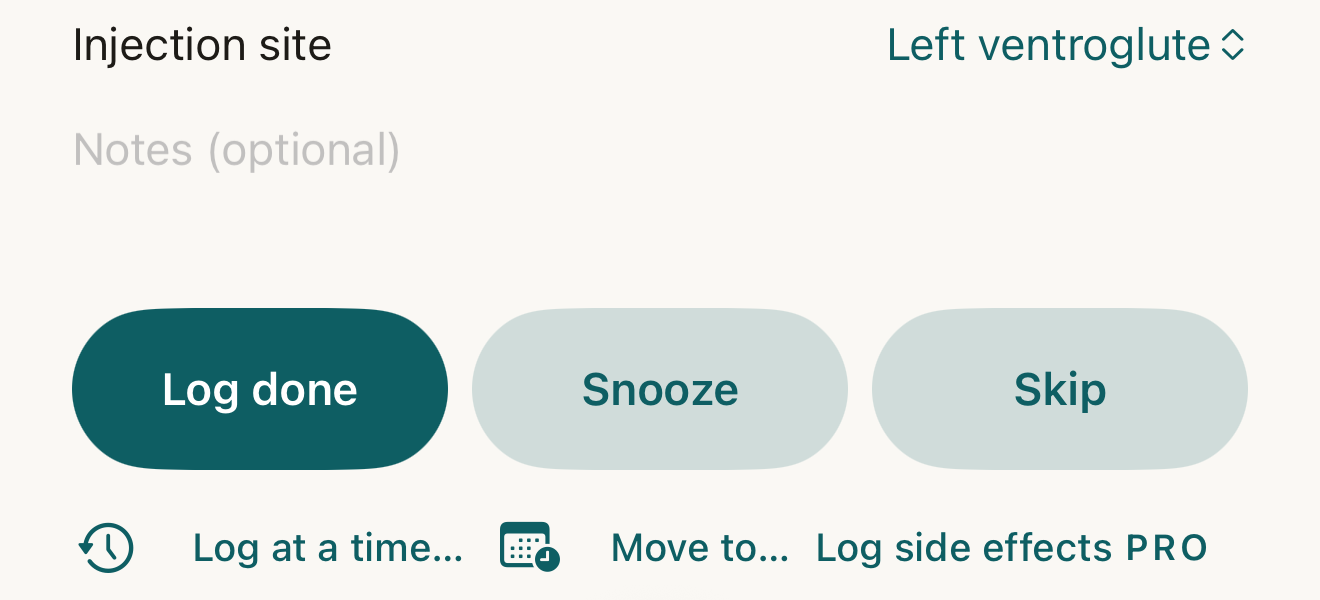
An expanded injectable dose: record it now, snooze, or skip, or use the quiet actions to record an earlier time or move it. - Injection site
- Notes
- Log done
- Snooze
- Skip
- Log at a time…
- Move to…
Where this screen comes from
- File
G1-F2-dose-expanded-injectable.png(1320×600);G1-F2-dose-expanded-injectable.webpis a lossy encode of it- Derivative SHA-256
25db73e8bb2105572562f0961cb78e0abeb65e4e973ebf622b4c197226f38199- Source
store-2-dose-expanded.pngin packageKeel-V1-4cbadaa-store-listing-20260908-1619- Source SHA-256
d7cf95fba9d2af169ec03a5d5a4f5d0272440fdfbcdb28d74e4ff8ac5e384166- Package seal
bb6bb8cb8f301a369afef5cc37180914f5d7196376f0be585127f6cb51993aa6- Captured from
- Keel 1.0.0 (1), implementation
4cbadaa1c63a0678b61e703583fadc9af226267d(reused-unchanged) - Operation
- crop x0 y1925 w1320 h600 (source pixels, origin top-left)
The numbered markers are drawn by the page, not into the image. Full provenance.
- Took it earlier? Use Log at a time… — see the earlier-time guide. Not now? See the snooze guide.


What changes
The log carries Taken at = now. A timed dose is judged Done (under an hour after the planned time, or the Move time if moved — or earlier) or Late (an hour or more); an any-time dose is Done when logged on its own or an earlier calendar day and Late only on a later day; a snooze never changes either judgement. The row keeps its place under Done · n and never drifts to Missed; the header’s "n of m taken today" counts it; an attached supply profile draws down only when Pro inventory access, a readable amount + unit, a convertible unit and an unconflicted balance all apply — otherwise the log still records and the draw is zero.
Where: The row under Done · n and the header’s "n of m taken today"
Correct a mistake
Tap the filled mark, or open the row under Done · n and tap Undo — the dose returns to pending and any supply draw is reversed; the record stays in history as reversed.
- Edit log changes what was recorded instead.
If it looks different
- No Snooze capsule?
- The dose is any-time, or the routine has no snooze options.
- Needs review on the row?
- This synced history must be resolved first; the mark is disabled.
- Log side effects with a Pro mark on the open row?
- It starts a separate Pro record; it does not log the dose.
- "Couldn’t save"?
- Nothing was recorded; the list shows the true state.
Keel tracks. It never advises. Due, Late, Missed and Snoozed are classifications for your own record, and nothing here says what to take, how much, or when.