Keel · Guides · Inventory
Set up a supply profile
How do I track what I have on hand?
Tools › Vials & Inventory › New profile: choose the Type, name it, enter what the label says and how many containers you have, then attach it to a routine so logged doses draw it down.
AvailabilityPro feature — readable on Free
Tools › Vials & Inventory (or + › Vials & inventory) › New profile (Add your first profile on an empty list). Inventory is Pro: on Free the Tools row carries Pro and opens the membership sheet. The list footer: "Profiles track what you already have — nothing here is a suggestion of what to use."
Types
Fields vary by Type: Pre-filled vial, Peptide vial, Tablets / capsules, Content per container, or Custom — "The type describes how this supply is packaged and how its starting amount is calculated. Switch it anytime."
Steps
- Under Details, choose the Type, enter the Profile name and the Item "as the label reads", and pick a Category.
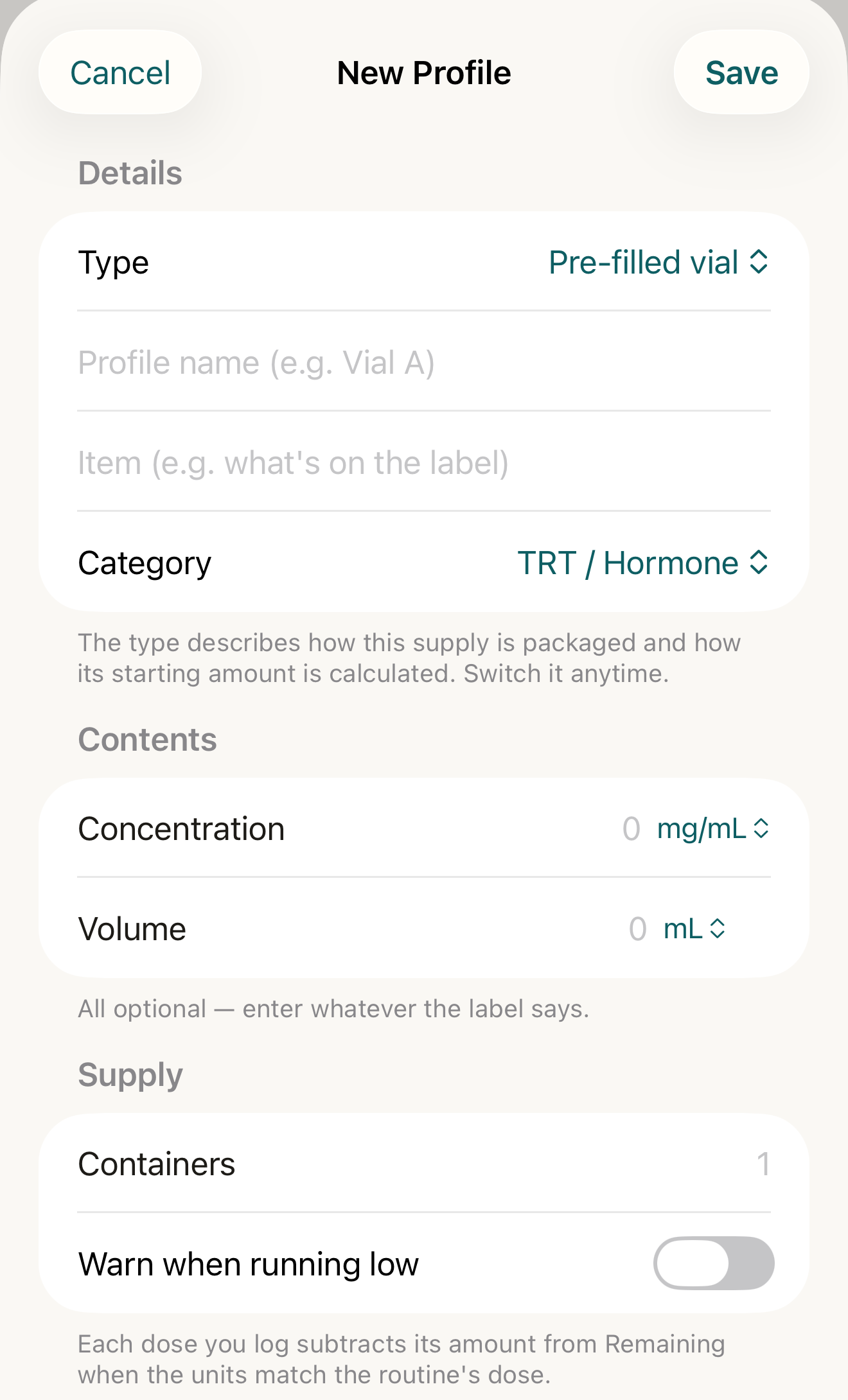
The profile form for a pre-filled vial: type, name, what the label says, and an optional low-supply warning — all as you enter it. - Type
- Profile name / Item
- Concentration / Volume
- Warn when running low
Where this screen comes from
- File
C6-F2-new-profile-form.png(1320×2180);C6-F2-new-profile-form.webpis a lossy encode of it- Derivative SHA-256
c3c5eef688e70ea6867619b6a65b6091615f553933bac36cd1405b6932bb2bda- Source
C6-F2.pngin packageKeel-WT-7e41269-guide-figures-B2-20260924-111151-1756- Source SHA-256
bb62348e52cc169f7bfd36a614ac25563ce8c9d9ebb20fcfaa5a1a48274684f1- Package seal
f9b0083234734b6b16f58e455596067bde9182e8e0ff62c5e84cdfae8ad22c6f- Captured from
- Keel 1.0.0 (1), implementation
working tree 7e41269 (NOT a candidate; head 7e4126919da3a44a9ad2f2efaf3ad2467c1fbff7, build-input tree c863167fe1474c471d3562fe90f5f107c9598edff3903cdfc58b89bc7ae3032c, build build-20260924-103514-93133) - Operation
- crop x0 y200 w1320 h2180 (source pixels, origin top-left)
The numbered markers are drawn by the page, not into the image.
- Under Contents ("All optional — enter whatever the label says."): Pre-filled vial — Concentration and Volume; Peptide vial — the strength field and Reconstituted with, after which Remaining is calculated; Content per container — its content field.
- Under Supply, set Containers (and Units per container for tablets / capsules); Custom types type Remaining themselves. Optional: turn on Warn when running low and set Warn at.
- Tap Save.

Attach it to a routine
- In the routine form’s Inventory section (Pro, shown once a profile exists) pick the profile under Vial / inventory; the footer states whether that routine’s dose can subtract from it — "Optional. Each logged dose subtracts from the attached profile when the units match." or the specific reason it cannot.
What changes
The list shows the profile’s name, item · category, the remaining amount, a Low mark when Warn when running low is on and the balance is at or under Warn at, and a forecast line. The profile’s detail shows Current balance, Restock and Correct Balance, and Supply history; once tracked, Remaining is read-only in the form — "This balance is kept by its supply history. Restock, correct, or reverse it from the profile’s detail view."
Where: Tools › Vials & Inventory and the profile’s detail

- Low mark
- remaining
- forecast line
Where this screen comes from
- File
G7-F1-inventory-list.png(1320×660);G7-F1-inventory-list.webpis a lossy encode of it- Derivative SHA-256
4dd75bc5c7ed5b4f0b3a32bb35600fdb3dcb609778997b8d6c044a6760dfc2ec- Source
promax/current/EV-037_inventory-s1-pro-light.pngin packageKeel-V1-4cbadaa-signoff- Source SHA-256
b33925057bc6b2988cfaae8a00395a35f1a9a46e72a075455dbc94b18a99f8b3- Package seal
65268f2b78728fbf82ba56a02668a2400276c526627da043627276887510b5b3- Captured from
- Keel 1.0.0 (1), implementation
4cbadaa1c63a0678b61e703583fadc9af226267d(reused-unchanged) - Operation
- crop x0 y470 w1320 h660 (source pixels, origin top-left)
The numbered markers are drawn by the page, not into the image. Full provenance.
If it looks different
- Can’t save yet?
- "Give the profile a name.", "Name what it tracks (e.g. the compound on the label).", "Amounts must be numbers.", "Enter the peptide strength per vial.", "Set a low-supply threshold amount."
- "Saved with a newer version’s supply type — kept as saved. Choose a type to reclassify."?
- The profile came from a newer Keel.
- Deleting a profile?
- "Routines and logs keep their history — only the supply tracking goes away."
A profile records what you already have; nothing here suggests what to buy, use or take.